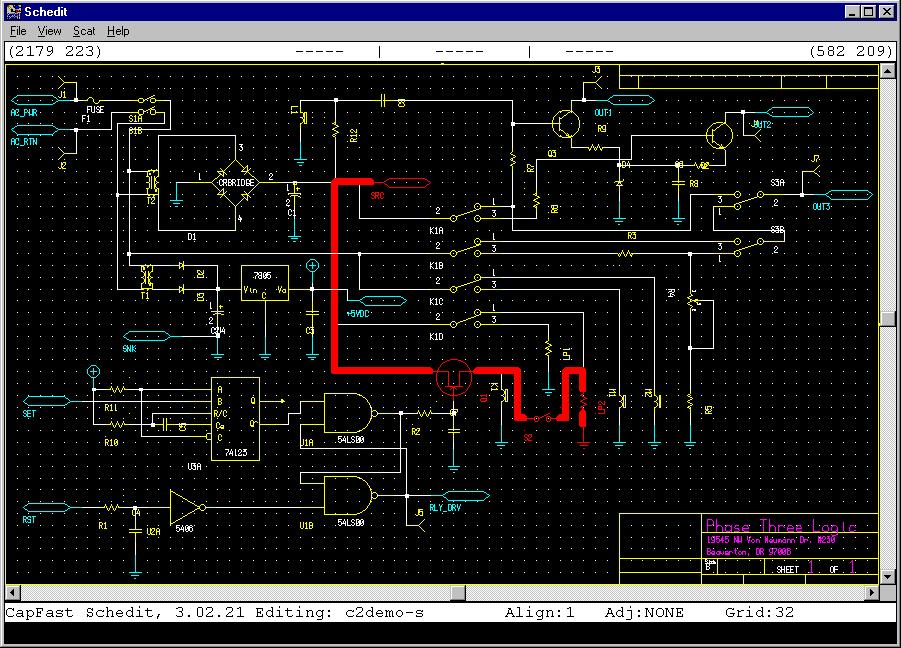
Sneak path (in RED) through single pole switch S2.
Perform Your Own Sneak Circuit Analysis:
Sneak Paths Graphically Highlighted in Color
Perform Analyses Early in the Design Process:
Interfaces to Popular CAE Environments
Session Log Automatically Documents Tests
Design Concern Analysis Addresses Over 40 Rules in App. C, MIL-STD-1543B
For more detailed descriptions please click here
The time-consuming and error-prone drudgery of Sneak Circuit Analysis has been automated, thus reducing the time it takes by magnitudes while insuring a complete and accurate analysis. Project Logs document the processes invoked by the user and associated results. These audit trails can be put into standard PC word processors for editing, formatting, printing, or incorporation into a larger document.
Formerly, the choices for performing sneak circuit analysis were to do it in-house or pay to have it done by an outside contractor. The cost to have it done by a contractor can be high and not easily controlled by your company. Manually performing the analysis in-house allows you to gain valuable insight and knowledge about the design, but ties up valuable resources for long periods of time. With CapFast/SCAT you can perform the analysis in-house quickly and cost effectively. You will gain knowledge and insight and produce a more robust design.
Perform Analysis Early in Your Design Process: The CapFast/SCAT tool does not require the generation of network trees. Network trees are useful when sneak analysis is being done visually: looking for "Y", Dome, "H" patterns, etc. Larger designs and multi-sheet schematics make visual methods time-consuming and error-prone. Instead, CapFast/SCAT uses the power of the computer to automatically and exhaustively identify all possible paths from source nodes to one or more sink nodes. CapFast/SCAT can be used as you complete portions of your design thus preventing more costly changes later in the design process. When your entire system is completed, CapFast/SCAT is used to test the entire design for sneak circuits. You can even quickly and easily create simple loads to see what impact, if any, the load may have on your design.
Ease of Use/Familiar Environment: CapFast/SCAT includes a user friendly, graphical user interface native to the Microsoft Windows 3.1 environment. The learning curve required to effectively utilize the tool is minimal. The tool prompts the user for information about the design and even offers potential solutions to problems. Potential sneak paths are displayed on the schematic highlighted in red, and are displayed individually for clear and error-free viewing and documentation.
Design Concerns Analysis: An optional addition to CapFast/SCAT is a comprehensive list of over 40 pre-defined Design Concerns such as Power-to-Power Tie, Loss of Ground, Totem Pole Outputs, Slow Rise and Fall Times, etc. You can select some or all of these design concerns to perform. Design Concerns Analysis helps you identify violations of a set of rules of good design practice. It also helps identify latent deficiencies that could lead to undesired events under unusual circumstances.
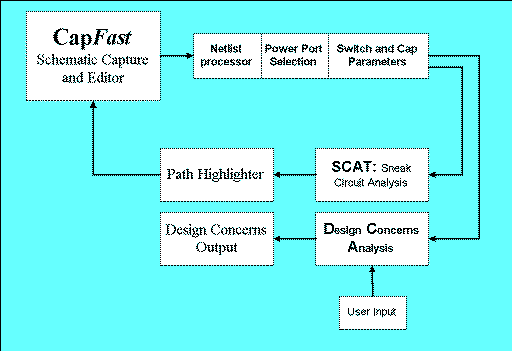
CapFast/SCAT Stand Alone or in Your CAE Environment: CapFast/SCAT is a complete environment. You can enter your designs using the CapFast schematic capture package. CapFast is a full-featured, easy-to-use schematic capture package. After schematic entry you start the circuit analysis and follow the prompting. Sneak paths are highlighted in a view of the schematic.
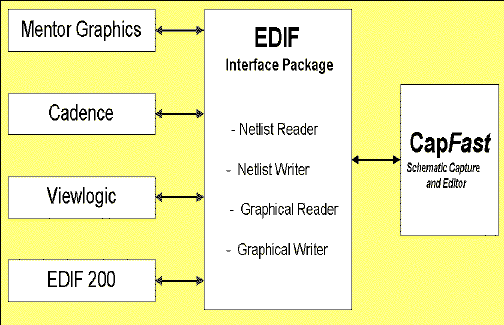
To use CapFast/SCAT with your existing CAE environments such as Mentor Graphics, Cadence, Viewlogic, and others, the Phase Three Logic Interface Package offers robust two-way EDIF transfers in both netlist and graphical formats. This means that you can start with a design captured with your workstation-based CAE tools and transfer symbols and schematics, without the loss of property information, to the CapFast environment. Or, you can enter your design in CapFast and transfer the finished design to your other CAE tools. The Interface package is available on both the PC and SUN or HP workstations.
Phase Three Logic has been engineering and marketing quality CAE tools since 1986. The SCAT technology was developed by SoHaR, Inc. under contract with Rome Air Development Center. SoHaR offers consulting services for Software and Hardware Reliability. Contact Phase Three Logic for more information.
Information: Phase Three Logic has technical white papers on the following subjects: For more information on sneak circuit analysis, ask for the "Introduction to CapFast/SCAT" paper. For more information on design concerns, ask for the Design Concerns List. Information is also available for CapFast and EDIF Tools. Call or fax your requests to Phase Three Logic at the numbers below or email techinfo@phase3.com.
Pricing and Ordering Information: Phase Three Logic offers an unconditional money-back guarantee to first time users. Products come with 1 year software maintenance.
Support: Customer satisfaction has been the number one
success factor at Phase Three Logic since 1986. Our Beaverton based
support can be reached by:
Phone: (503) 645-1551
FAX: (503) 645-2072
E-mail:
support@Phase3.com
A Recent SCAT Data Sheet [full page]
 Return to
CapFast/SCAT.
Return to
CapFast/SCAT.